Spring AMQP and Transaction Management
3 minutes read·13/07/2026
I often find myself grappling with the many intricacies of Spring's plethora of annotations. As much as I'd love to rant about the rampant use of them in the Spring ecosystem, that's best left for another day!
Now back to annotations. Among the most used ones is the @Transactional annotation. It is easy
enough to understand in the context of a database1, but what about RabbitMQ, and what about
database and RabbitMQ put together? Well, wonder no more!
This blog post exists as a short refresher to myself and any soul who may stumble upon this page. The behavior described below was verified with Spring Boot 4.0.7 and RabbitMQ 4.1.3 and 4.3.2.
A brief refresher on @Transactional
You put @Transactional on top of a method, and Spring executes that method within a transaction
managed by the Transaction Manager (which most often happens to be a database transaction, but it
can be something else as we'll soon see). After the method exits, the transaction is committed. But
if the method throws an unchecked exception, it's rolled back. Checked exceptions are not considered
for rollback unless configured with the rollbackFor element. Simple enough!
This @Transactional annotation has an element to set the transaction manager bean name called
transactionManager.
By default, Spring Boot creates a JPA transaction manager if no other transaction manager is defined in your application context and JPA is configured.
In most real-world Spring Boot projects, Spring Data JPA pulls in Spring ORM and Spring Boot
configures a JPA transaction manager. That transaction manager is then used by the @Transactional
annotation.
But now comes RabbitMQ. What exactly happens when we have this piece of innocent looking code?
@Transactional
public void saveAndForward(User user) {
  userRepository.save(user);
  rabbitTemplate.convertAndSend("USER_QUEUE", user);
}
Well, to understand this, we have to know about how RabbitMQ is configured in Spring AMQP.
RabbitMQ's transactional behavior
If RabbitTemplate.setChannelTransacted(true) is set in your RabbitTemplate bean definition, and
assuming you're using JPA, then Spring synchronizes the RabbitMQ channel transaction with the JPA
transaction. So, if, for any reason, the JPA transaction is rolled back, the message will not be
sent.
But this transactional behavior is best efforts only and atomicity is not guaranteed!
Take this scenario for example,
- You save an entity to the database.
- Then you send a message to RabbitMQ.
- The method returns without any exceptions.
- Database transaction is successfully committed.
- Then Spring tries to commit the RabbitMQ transaction, but it fails (maybe because of a network issue, or the broker is down).
- The entity is persisted to the database, but the message may not be sent.
The following diagram illustrates this failure path:
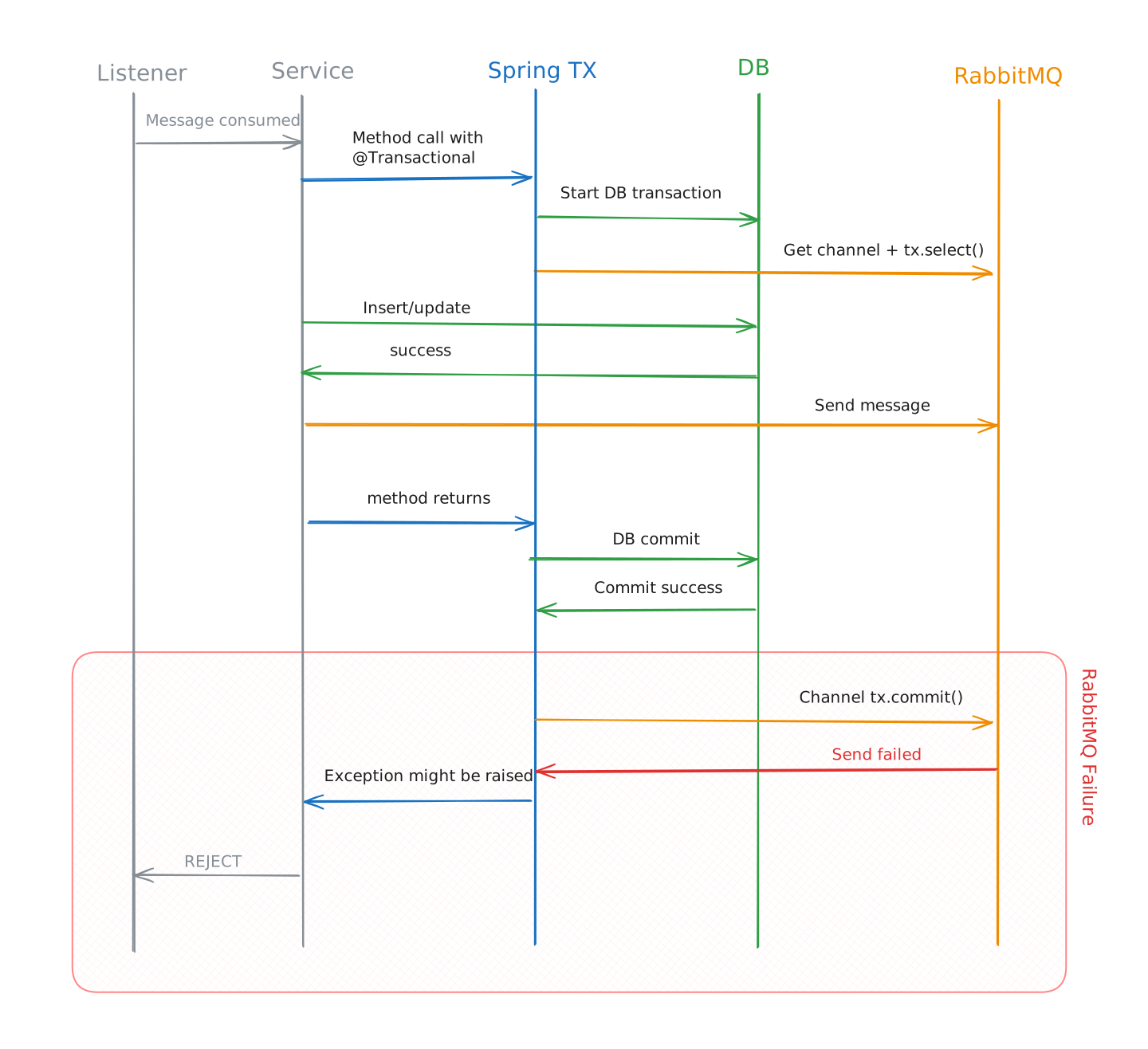 Spring Database +
RabbitMQ Transaction Failure Path
Spring Database +
RabbitMQ Transaction Failure Path
So it's not guaranteed that both will succeed, or both will fail2. If you need that level of atomicity, you'll need to use something like the transactional outbox pattern.
Now that we know how RabbitMQ works with the @Transactional annotation, let's look at another
example of how you can use it when no database is involved (assuming the primary transaction manager
is a JPA one).
Let's say we have the following code,
@Transactional
public void sendMessages(User user) {
  rabbitTemplate.convertAndSend("USER_QUEUE", user);
  rabbitTemplate.convertAndSend("SETTINGS_QUEUE", user);
}
Can you see what's wrong with this code?
Although we're only dealing with RabbitMQ message publishing here, it's also opening a databased
transaction when we used the @Transactional annotation. We do want a transactional boundary here,
just not necessarily something that involves the database.
To solve this exact issue, we need to use a RabbitTransactionManager. We can define it by,
@Bean
public RabbitTransactionManager rabbitTransactionManager(
  ConnectionFactory connectionFactory
) {
  return new RabbitTransactionManager(connectionFactory);
}
But if we define any transaction manager, the default JPA transaction manager that Spring Boot creates will not be present. So we'll need to explicitly define it as well.
@Bean
@Primary
PlatformTransactionManager transactionManager(EntityManagerFactory emf) {
  return new JpaTransactionManager(emf);
}
Now the JPA transaction manager will be used when we use the @Transactional annotation without
specifying any transactionManager because of the @Primary annotation.
And for the earlier code example of MessageService.java we can use this RabbitTransactionManager to publish the
messages within a transactional boundary without involving the database at all. Neat!
@Transactional(transactionManager = "rabbitTransactionManager")
public void sendMessages(User user) {
  rabbitTemplate.convertAndSend("USER_QUEUE", user);
  rabbitTemplate.convertAndSend("SETTINGS_QUEUE", user);
}
Please note that RabbitTemplate must use the same ConnectionFactory as the
RabbitTransactionManager for this to work!
Both of these RabbitMQ publishes operate under the same channel transaction. However, RabbitMQ guarantees atomicity only when the transaction involves a single queue. Please check the RabbitMQ docs for more details.
Rejecting messages on failure
Sending messages to RabbitMQ is one side of the coin, but what about consuming messages? What will happen if the message consumer throws an exception?
If you want the listener to reject a message when it fails (maybe because you want to send it to a Dead Letter Queue), you need to set the following property.
spring:
  rabbitmq:
    listener:
      simple:
        default-requeue-rejected: "false"
Setting this default-requeue-rejected to true results in the message being requeued. If the
failure was not transient in nature and you have only one consumer for a given queue, this might
result in an infinite loop, which probably is not what you want.
This property has no bearing on the transactional behavior, it only controls whether the rejected message is requeued or not.
Hopefully this post has shed some light on how Spring AMQP works with the @Transactional
annotation and what happens when a database gets in the mix.
Footnotes
-
Well, probably not 🤐 ↩
-
As always, check the Spring AMQP documentation for more details. ↩